
Published Sep 7, 2026, 5:00 PM EDT
Abhijith has been writing for the Web since 2011 and has contributed to sites like Beebom and TechWiser. He is curious about making the best of tech accessible to everyone.
He started writing as a hobby after getting a computer at 16. Since then, he has found technical writing a space where he belongs and could make a difference. A curious and self-motivated person, Abhijith’s writings focus on productivity, Android, and the Internet.
He holds a Master’s degree in English and a PhD in Humanities. Enthusiastic about language, literature, and culture, he works as an Assistant Professor of English.
If not writing or reading, you can find Abhijith playing Chess or CODM.
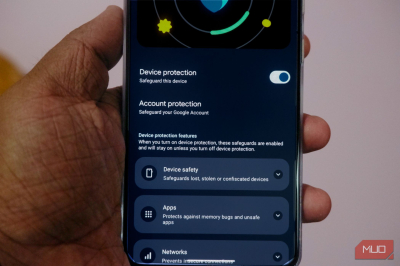
When people compare Android and iOS, they tend to put iOS in the “more secure” category, but that is a matter of perception. The latest versions of Android actually pack many security-focused features! Recently, I tried turning on Android’s strongest security switch, called Advanced Protection, and the experience was an eye-opener.
Many features I had been using stopped working within a day, and it changed what Android meant as a smartphone OS.
Sideloaded apps stopped installing or updating
My F-Droid habit hit a wall immediately
Credit: Abhijith N Arjunan/MakeUseOf
The Google Play Store has never been sufficient to satisfy my curiosity about Android apps, and I almost always resort to sideloading. However, with Advanced Protection enabled, Android no longer allows me to install apps from unknown sources, including F-Droid and GitHub. My Android smartphone also blocked updates to already installed non-Play Store apps.
Google advocates this stance because apps outside the Play Store do not go through the same security mechanisms as those on the Play Store. Attackers can also convince or compel people to sideload malware by installing APK files from untrusted sources. In this attempt, Android also mandates the use of Google Play Protect, which scans your device.
Unless your work requires you to explore apps from non-Play Store sources, this change wouldn’t affect you. If you trust an app, you can always turn off Advanced Protection, install the app, and turn the security switch back on.
Chrome got noticeably slower on some sites
Turns out the JavaScript optimizer was doing a lot
Android Safe Browser is another setting that Advanced Protection enabled on my device. It introduces several changes and disables some JavaScript-based features in web browsers. Although the option doesn’t disable JavaScript entirely, Chrome no longer runs JavaScript optimizations that reduce execution time.
Advanced Protection makes this change because many attacks target vulnerabilities in JavaScript engines. If you’re still using Google Chrome as your default browser on your Android smartphone, this can make certain websites run substantially slower. I tried Chrome for a bit, and the change was evident.
Yet, as someone who doesn’t exclusively use Google Chrome, I didn’t find this a particular problem.
Accessibility apps got locked out overnight
Turns out not every tool made Google’s trusted list
Credit: Pankil Shah / MakeUseOf
The restrictions imposed on apps using accessibility services were probably the biggest hindrance I noticed after enabling Advanced Protection. I regularly recommend and use multiple apps that use Accessibility services to customize the Android experience. These include automation apps, notification management apps, and third-party input apps, all of which faced an issue.
From a security standpoint, this decision makes sense because the accessibility permission gives an application too much power. And I wouldn’t recommend allowing those permissions to an app that you don’t really trust. You’d also have noticed that some banking/financial apps wouldn’t work when you allowed apps to use Accessibility services.
Now, even with Advanced Protection enabled, Google allows apps on a verified list to use these services. But as you can guess, not all apps that you love made it to that list.
My watch stopped unlocking my phone
The one convenience feature I actually missed
Credit: Tashreef Shareef / MakeUseOf
Advanced Protection also disabled one of my convenience-oriented features: Extend Unlock. This feature lets me skip fingerprint or face recognition when I’m wearing my smartwatch. The feature uses Bluetooth to check whether the watch is in my vicinity. This feature is no longer available now that Advanced Protection is active.
The reasoning Google follows here is also pretty simple: threat actors can manipulate a wearable device or simulate its presence to gain access to the smartphone. More importantly, proximity sensors aren’t the most sophisticated way to authenticate access to your device. Was this inconvenient? Yes. Would I strongly object to this? No.
My phone refused to fall back to 2G
Great for security, rough in dead zones
Credit: Brandon Miniman / MakeUseOf
When the world is talking about 6G, you are definitely not talking about 2G networks, but in some places, your phone still uses 2G networks for connectivity in worst-case scenarios. Advanced Protection, however, turns this option off because 2G isn’t sufficiently secure. As someone who sometimes travels to rural areas, this change caused some limitations.
Furthermore, some places don’t have 3G or 4G connectivity. In these cases, you may need to rely on 2G for basic calling, but that doesn’t work when Advanced Protection is enabled. On the bright side, if you live in a city, this change protects your device from attacks that exploit vulnerabilities in 2G infrastructure.
One big caveat: 2G networking in the USA was officially turned off in August 2026. Where I live, 2G networking is still available.
Who should think twice before flipping this
You may already know that many of these changes aren’t deal-breakers for many people. Still, if you regularly install applications from non-Play Store sources and rely on apps that use the Accessibility service, you should think twice before turning on Android Advanced Protection. For others, Advanced Protection is a one-click way to help ensure your smartphone isn’t exposed to the many threats out there!
Leave a Reply