
Yasin Hasan/Shutterstock
While it has been over a decade since Apple started selling smartwatches, Google’s own smartwatch hardware debuted less than four years ago, after it acquired Fitbit – a brand known for its fitness trackers and smartwatches. That said, Google has been working on smartwatch technologies for almost as long as Apple, via its involvement with Wear OS (and as Android Wear in its previous avatar). Despite both companies offering some of the best smartwatches, the Pixel Watch hardware and the various Apple Watch models are locked to their respective ecosystems, making the Pixel smartwatches most suitable for Android owners and the Apple Watch models for iPhone owners.
However, the ecosystem restrictions aside, the Apple Watch and the Pixel Watch lineups include a number of features that set them apart from each other and give them an advantage over the other. For example, Google’s Pixel Watch shines in terms of AI implementation, whereas Apple’s integration with its ecosystem of devices remains unmatched.
Design and hardware variety
i viewfinder/Shutterstock
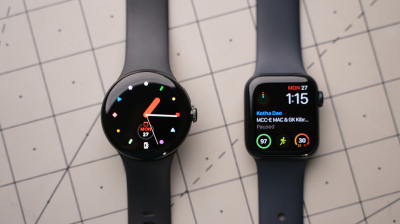
One of the most visible ways in which the Apple and Pixel smartwatches are different is the design and hardware variety. While Google has opted for a circular design resembling traditional wristwatches, Apple gives its smartwatches a “squircle” form factor. Although design is a subjective choice and preferences vary, Apple has a slight advantage in terms of hardware variety, as it offers multiple models as part of its smartwatch lineup, including its rugged Watch Ultra models, which don’t have a direct competitor in Google’s lineup.
More importantly, the Watch Ultra models not only have a more durable build, thanks to their grade 5 titanium casing, but they also include some professional-grade, athlete-oriented features, such as depth gauge certification for scuba diving and precision start in workouts, which you don’t get in the Pixel Watch. That said, Android owners looking at the Pixel Watch for their next smartwatch purchase have a good rugged alternative in the Samsung Galaxy Watch Ultra. However, it also lacks advanced diving tools and satellite SOS, among other features. If you’re willing to look beyond Wear OS, the number of alternatives increases exponentially, with options from Garmin, Polar, and others. That said, the Pixel Watch offers a more subtle look that blends in with most attire, so if you’re looking for something that doesn’t scream smartwatch, Google has you covered.
Health and fitness tracking
Wongsakorn 2468/Shutterstock
Apple’s and Google’s offerings have most of the health and fitness essentials you expect from a smartwatch, such as heart rate tracking, blood oxygen monitoring, and the ability to track various workouts. However, both diverge in their training philosophies and have some features that you don’t get in the other. For example, Google’s Pixel Watch focuses more on your Readiness Score and Target Cardio Load, while the Apple Watch models establish a statistical baseline and compare it to your training load, offering more of a retrospective overview.
In terms of passive medical screening, Google’s offerings are limited to Irregular Heart Rhythm (AFib) detection, whereas some Apple Watch models can offer hypertension alerts, sleep apnea notifications, and AFib detection. That said, the Pixel Watch 4 can measure your stress levels using the built-in cEDA sensor, something that’s not available on the Apple Watch models.
More importantly, while the basic health and fitness tracking is free on the Pixel Watch, if you want historical biometric trends or Google Health Coach analytics and an adaptive running plan, you’ll need a premium subscription. The Apple Watch requires no premium subscription to access present or historical data.
AI integration
Erman Gunes/Shutterstock
Apple and Google have taken different approaches to AI integration on their smartwatches. Google has integrated the full Gemini AI on its Pixel Watch 4, so you can talk to the AI whenever you want using the Raise to Talk gesture. It can process complex requests on the go, making it much more useful than the older Google Assistant. You also get AI integration in the Smart Replies feature in various communication apps, such as Google Messages and WhatsApp. These can come in handy as a smartwatch doesn’t really have a big screen for typing and sending messages. More importantly, you get AI in Google Health Coach, which can create customized fitness plans for you; however, you need to pay for that, and it has just come out of preview. Other AI enhancements include the use of machine learning to augment GPS data for better precision and improved sleep tracking accuracy.
Apple is more subtle with its AI integration, and instead of putting an AI assistant front and center, it is boosting different features and functions with AI in the background. For example, it uses local machine learning to order and place items in the Smart Stack to make them more useful given your location, time of day, and historical data. The Apple Watch also leverages Apple Intelligence to offer Live Translation in messages. Plus, machine learning is used to improve the various health, safety, and fitness features of the smartwatch, but none of those are visibly AI-enhanced. While Google explicitly uses AI to make its smartwatch more useful, some people might prefer Apple’s more understated implementation.
Battery and charging
i viewfinder/Shutterstock
Google’s claimed battery backup for the Pixel Watch 4 shows a slight advantage over the more mainstream Apple Watch Series models. However, the Apple Watch Ultra 3 matches or exceeds the Pixel smartwatch. The Pixel Watch 4 is rated for up to 40 hours in regular mode and up to 72 hours in low-power mode (depending on the size), whereas the Watch Ultra 3 can last up to 42 hours in regular mode and up to 72 hours in low-power mode.
The Series 11 and Watch SE 3 are limited to around 24 hours and 18 hours in regular mode, respectively. The low-power mode increases the backup to 38 hours in the case of Series 11 and 32 hours for the Watch SE 3. The charging speed of the Series 11 and Pixel Watch 4 models is largely the same, with both taking around 30 minutes to go from 0-80%. The Watch Ultra 3 and SE 3, however, can take up to 45 minutes for the same. If, as an Android user, you are looking for longer battery life, you can consider the previously mentioned Samsung Galaxy Watch Ultra, which can last up to 60 hours in regular mode and 100 hours in power-saving mode.
Safety and lifesaving features
Justin Sullivan/Getty Images
Another area where Apple and Google’s smartwatch offerings have set themselves apart is the built-in safety and lifesaving features. One of the Pixel Watch 4’s most notable features is support for satellite SOS, which enables you to call emergency services even when you don’t have a cellular network and your phone is dead. While the Apple Watch Ultra 3 has a similar feature, you don’t get it on the more mainstream Series 11 model or the cheaper Watch SE.
All Apple Watch models also lack a “Loss of Pulse Detection” feature, which, on the Pixel Watch, automatically calls emergency services and shares your GPS coordinates when there is a sudden and total loss of pulse. This can be pretty helpful in rare life-threatening scenarios. That said, Apple Watch models have Crash Detection to call emergency services, similar to the Pixel Watch. Both watches have ECG functionality.
Leave a Reply