
Skip to content
Image: Jon L. Jacobi
At a glance Expert’s Rating
Pros
Good 10Gbps performance, especially with very large files
Can be geo-located using Apple “Find My”
Compact and rugged
Cons
Test unit’s geo-tag worked only intermittently
Requires CR2032 battery (provided)
Our Verdict
If you need an SSD that you can track down should it mysteriously disappear, the Expert P34F is a fine—and only, as far as I’m aware—choice. It’s also an especially good 10Gbps performer with very long writes. However, our test unit’s geo-tag worked only intermittently.
Price When Reviewed
This value will show the geolocated pricing text for product undefined
Best Pricing Today
Best Prices Today: Teamgroup Expert P34F Geotagged 10Gbps SSD
If you’re shepherding storage devices on a regular basis, or you’re prone to setting stuff in odd places, or you just want something innocuous in your laptop or camera bag that can be geo-located, then you should look at Teamgroup’s Expert P34F with its Apple Find My-compatible geo-tag.
That it’s a good 10Gbps performer, especially with large files is another plus. My enthusiasm is tempered by the fact that our test unit’s geo-tag didn’t work reliably.
Read on to learn more, then see our roundup of the best external drives for comparison.
What are the Teamgroup Expert P34F’s features?
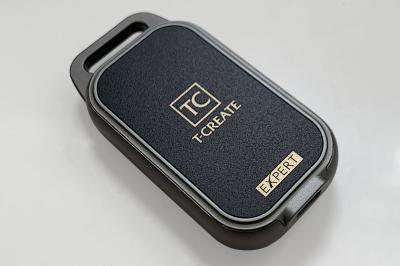
The Expert P34F is a 10Gbps USB SSD featuring a Type-C connector on one end and a rather substantial lanyard point on the other. It’s colored an attractive mix of pewter and black with gold lettering.
The drive, which comes with a three-year warranty, measures around 3.36 inches long, by 1.25-inches wide, by 0.7-inches thick and weighs roughly 2.5 ounces with the battery installed. Svelte, but also more prone to being easily losable.
Of course, that potential for being misplaced is countered by Apple’s Find My functionality, which allows you to have the P34F play a sound so you can locate it.
The CR2032 battery compartment on the Teamgroup Expert P34F.
In order to power the geo-tagging, the P34F sports a CR2032 battery that’s inserted into a battery compartment on the back of the unit. Kudos for it being replaceable, but alas, it’s a rather loose fit to the contacts which might explain why the geo-locating was spotty.
How well does the Teamgroup Expert P34F’s tracking work?
When I was able to get the unit operating, the tracking worked as expected and the P34F showed up in the iOS/macOS Find My apps at my location. Sweet. Alas, that was only after a lot of futzing with the circular battery cover and rotating it so that it’s not quite in the full locked position. Even then, it only showed up for a bit.
This is how adding the P34F should go. It did, but only after a lot of futzing.
Noticing that the battery didn’t fit tightly I stuffed a small bit of paper into the side of the compartment to force the CR2032 battery to make contact with the negative terminal. This fixed the issue, but only for a while, and the Expert P34F would never connect reliably. I also tried several other CR2032 batteries.
When I was able to get the unit operating, the tracking worked as expected…
Alas, while the P34F was spotted for about 10 minutes, two days later it hadn’t phoned home beyond that.
The P34F makes a distinctive happy multi-chirp when you have the battery seated correctly, and a single chirp when it comes loose. I heard both a lot as I tried to troubleshoot the unit.
I got in touch with the company, but the issue was never resolved. Hopefully, it’s a one-off with our unit, but it might not be. If you take the chance—test it before you ditch the return shipping materials.
How much does the Teamgroup Expert P34F cost?
SSD prices have risen in the last few months and the Expert P34F therefore costs a somewhat hefty $116 in its 512GB capacity, and $196 in the 1TB. You are of course paying extra for the geo location. There’s a 2TB version in the works, but it wasn’t available or priced at the time of this writing. My guess is that it will be close to $270. Yes, I can do simple math.
How fast is the Teamgroup Expert P34F?
While not quite as fast as the Seagate Ultra Compact SSD overall, the 1TB Expert P34F we tested did outdistance its rival (if a non-geo-tagged SSD could be considered a rival) by a significant margin in our 450GB write. For large files, it’s one of the best 10Gbps SSDs we’ve tested.
The P34F was right up there with the Seagate Ultra Compact SSD in CrystalDiskMark 8’s sequential throughput tests.
The P34F was right up there with the Seagate Ultra Compact SSD in CrystalDiskMark 8’s sequential throughput tests.
The Expert P34F wasn’t nearly as fast with 4K files under CrystalDiskMark 8 as it was with larger ones, but it still wasn’t half bad. This is where the Seagate drive is uniquely quick for a 10Gbps SSD.
The Expert P34F wasn’t nearly as fast with 4K files as it was with larger ones, but it still wasn’t half bad.
The P34F’s 48GB transfer times were good, if a bit uneven.
The P34F’s 48GB transfer times were good, if a bit uneven.
While the Expert P34F’s write speed with our 450GB file wasn’t particularly awesome, it was awesomely consistent — unlike the Adata SC735 which slowed down drastically along the way.
While the Expert P34F’s write speed with our 450GB file wasn’t particularly awesome, it was awesomely consistent.
Below you can see just how steady the Expert P34F’s write speed was. Keep in mind that this is a 1TB unit, and cheaper 1TB SSDs generally slow down quite a bit before the end of this test.
Overall, the Expert P34F is a good performer and exceptional at sustained long writes.
Should you buy the Teamgroup Expert P34F?
As a storage device the Expert P34F performs well and certainly fulfills that function. The addition of providing a not-so-obvious geo-tag in your laptop bag has some value — if it works reliably. Thus, my buy recommendation is qualified — test your unit immediately.
I’m assuming that Teamgroup won’t be shipping a ton of defective product, but check back here for the latest and to see if it’s earned another star that a fully working unit would’ve warranted.
How we test
Drive tests currently utilize Windows 11 24H2, 64-bit running off of a PCIe 4.0 Samsung 990 Pro in an Asus Z890-Creator WiFi (PCIe 4.0/5.0) motherboard. The CPU is a Core Ultra i5 225 feeding/fed by two Kingston Fury 32GB DDR5 4800MHz modules (64GB of memory total). Both 20Gbps USB and Thunderbolt 5 are integrated and Intel CPU/GPU graphics are used. SSDs involved in the test are mounted in a HighPoint 7604A 16x PCIe 5.0 adapter card.
We run the CrystalDiskMark 8, AS SSD 2, and ATTO 4 synthetic benchmarks (to keep article length down, we only report one) to find the storage device’s potential performance, then a series of 48GB and 450GB transfers tests using Windows Explorer drag and drop to show what you’ll see under Window, as well as the far faster Xcopy to show what’s possible.
The 48GB and 450GB write tests are written to/from a 25GBps two-SSD RAID 0 array on the aforementioned Highpoint 7604A. Formerly the 48GB tests were done with a RAM disk.
Each test is performed on a newly NTFS-formatted and TRIM’d drive so the results are optimal. Note that in normal use, as a drive fills up, performance may decrease due to less NAND for secondary caching, as well as other factors. This can be less of a factor with the current crop of SSDs with far faster late-generation NAND.
Caveat: The performance numbers shown apply only to the drive we were shipped and to the capacity tested. SSD performance can and will vary by capacity due to more or fewer chips to shotgun reads/writes across and the amount of NAND available for secondary caching. Vendors also occasionally swap components. If you ever notice a large discrepancy between the performance you experience and that which we report, by all means, let us know.
Best Prices Today: Teamgroup Expert P34F Geotagged 10Gbps SSD
Author: Jon L. Jacobi, Contributor, PCWorld
Jon Jacobi is a musician, former x86/6800 programmer, and long-time computer enthusiast. He writes reviews on TVs, SSDs, dash cams, remote access software, Bluetooth speakers, and sundry other consumer-tech hardware and software.
Leave a Reply